Empty Tower.$prf
Objavljena: Pet Jan 30, 2026 11:20 am
Hello,
I am experiencing an issue with the steel section library in Tower 8.
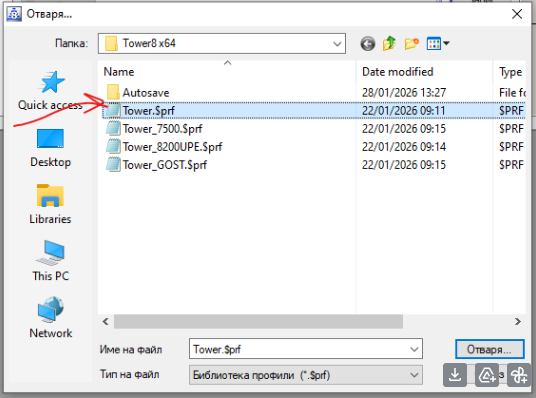
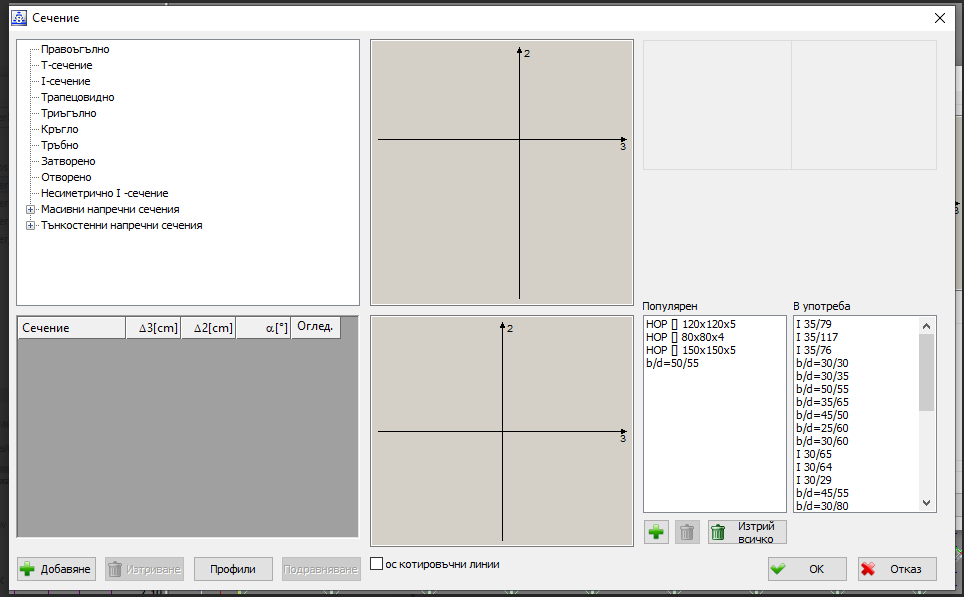
The steel sections are missing from the Library. As far as I understand, Tower 8 should include multiple steel section catalogues compliant with EC-3 and other standards. However, even though the default Tower.$prf file is selected, no steel sections appear (as shown in the attached screenshot).
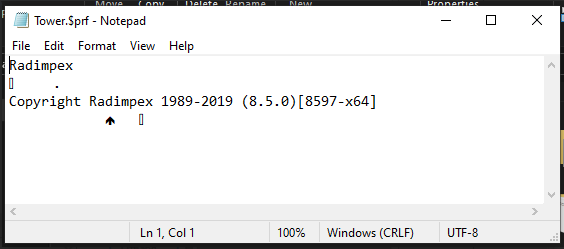
I also tried opening the Tower.$prf file with Notepad and found that it appears to be empty. The file size is only 1 KB, which suggests that it does not contain any section data (see attached screenshot).
I have since obtained steel section catalogues from colleagues who also use Tower 8, and I was able to successfully import those catalogues. This confirms that importing external catalogues works correctly.
Could you please provide a non-empty Tower.$prf file (or the correct default steel section catalogue) so I can restore the standard steel sections?
I am experiencing an issue with the steel section library in Tower 8.
The steel sections are missing from the Library. As far as I understand, Tower 8 should include multiple steel section catalogues compliant with EC-3 and other standards. However, even though the default Tower.$prf file is selected, no steel sections appear (as shown in the attached screenshot).
I also tried opening the Tower.$prf file with Notepad and found that it appears to be empty. The file size is only 1 KB, which suggests that it does not contain any section data (see attached screenshot).
I have since obtained steel section catalogues from colleagues who also use Tower 8, and I was able to successfully import those catalogues. This confirms that importing external catalogues works correctly.
Could you please provide a non-empty Tower.$prf file (or the correct default steel section catalogue) so I can restore the standard steel sections?